Configuration
Everything is configured from the machine itself, with the joystick. A cabinet has no keyboard and no mouse, so armanager writes the emulator configuration for you: you pick how many buttons your cabinet has, and the joysticks are mapped from there. There is no file to edit by hand.
- How many buttons
- Joysticks
- Changing the buttons of a game
- On a PC with a keyboard
- Adding and removing software
- Emulator settings
- Going back to the default settings
How many buttons
This is the only thing you have to tell armanager about your cabinet, and it is asked the first time it runs. To change it later go to Configure → Buttons config and choose 10 or 12 buttons per player:
The last two buttons of each player are not game buttons. They are always in the same place, so they do not move when you change emulator:
| Cabinet | Game buttons | System button | Exit button |
|---|---|---|---|
| 10 buttons | 1 to 8 | 9 | 10 |
| 12 buttons | 1 to 10 | 11 | 12 |
The system button is the one that opens the configuration of whatever emulator is running, and the exit button closes the game and takes you back to the menu.
The game buttons keep the same meaning in every emulator, which is the point: buttons 1 to 6 are the first six actions of the system, 7 is select, 8 is start, and on a 12-button cabinet 9 and 10 are two more actions. select and start do not change place between a 10-button and a 12-button cabinet.
Joysticks
You do not have to map anything. When armanager sets up the machine it writes the joystick mapping for MAME, mednafen and RetroArch, and the joysticks that are plugged in are assigned in order: the first one is player 1, the second one is player 2. This matters because mednafen and RetroArch do not assign joysticks by themselves: left alone, mednafen leaves player 2 with no controller at all, and RetroArch does not bind a single button unless it recognises the pad.
If you plug a controller in later, or you swap it for another one, go to Admin software → Config software, enter the emulator and press Map joysticks. Nothing else in the configuration is touched.
If the two players are swapped, swap the two cables: the order is the order in which the system sees the controllers, and it is the same order for every emulator at once, so they can never disagree with each other.
Changing the buttons of a game
The mapping armanager writes is a starting point, not an imposition. Someone who plays fighting games wants the hard punches at the bottom, and the next player wants them somewhere else, so every emulator keeps its own way of remapping and what you change stays changed:
| Emulator | How to get to its controls |
|---|---|
| MAME | System button, then Input (this machine) |
| mednafen | System button + button 1 for player 1, system button + button 2 for player 2 |
| RetroArch | System button, then Quick Menu → Controls |
In mednafen the combination starts the same button-by-button configuration that it has always had: it asks for each control on screen and you press the button you want for it. It is saved by mednafen itself.
In RetroArch use Quick Menu → Controls and nothing else. It saves one file per core, on top of the default mapping, and it survives restarts. Changing buttons in Settings → Input looks like it works but is lost when you leave, because the default mapping is applied again on every start.
On a PC with a keyboard
Armanager is made for a cabinet, but it does not take the keyboard away: the original keyboard shortcuts of every emulator are still there, untouched, and you can use it on a normal PC with no joystick plugged in at all.
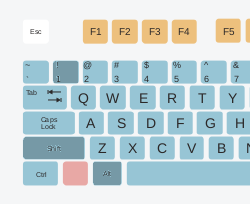
MAME and RetroArch open their menus with Tab (the same key the system button sends). In mednafen the shortcut is Alt+Shift+1 for player 1 and Alt+Shift+2 for player 2:
The screen shows input_config1 (1) and mednafen starts asking for each control.
These shortcuts can themselves be remapped from inside mednafen with Shift+F2, which is what this page used to explain as the only way to configure a cabinet without a keyboard. It is no longer needed: armanager writes that same setting for you. Be careful with it, because it is easy to overwrite a different shortcut by mistake; if that happens, reset the configuration.
Adding and removing software
Installing armanager brings the arcade menu and MAME. The rest is optional and is installed from the machine itself, with the joystick, in Admin software → Additional software:
Each one has its own screen with its description and an Install or Remove button. RetroArch, once installed, also has a Cores button to install the console cores (NES, SNES, Mega Drive, Game Boy...) one by one.
What is not installed is never offered anywhere else: it does not appear when you add an emulator to a game, and it does not appear in the settings menu. A machine only shows what it can actually run.
Emulator settings
In Admin software → Config software there is one screen per program, and only for the ones that are installed. Every screen is a list of settings you move through with the joystick, with a Save button and a Reset configuration button:
karbeat is the rhythm game that comes with py3karaoke: it plays the drums or the melody of a KAR file with the cabinet buttons. Its screen sets which instrument to play, how many buttons to use, whether to show the lyrics, the volumes, and the audio/video calibration of the machine in milliseconds, which is the one setting that depends on your hardware and not on your taste.
Going back to the default settings
Nothing goes back to the defaults on its own. If a configuration ends up broken you have two ways out, and both ask for confirmation first:
- Reset configuration, in the settings screen of a single program: it only resets that one.
- Configure → Reset all config: it sets up the whole machine again, as it did the first time it ran.